
The perfect storm created by the skilled labor crisis, affordability concerns, and drastic shortage of available housing makes residential construction feel ripe for disruption. Industry advisor Mark Richardson recently hosted a Thought Leaders call with remodeling and home improvement executives who shared how their companies are investing in technology: primarily artificial intelligence for organization/project management, call centers/text messaging, and design renderings. These executives felt that AI is moving faster than anyone had anticipated, and companies that fail to adopt it risk quickly falling behind. The tech sector makes up more than AI, though, and while many are not practical for remodelers, a few are absolutely worth considering.
Construction technology can be categorized into various areas. Automation and robotics are major players, as laborious tasks such as brick-laying, tile setting, layout, and even excavation and painting could be delegated to robots. Many robots, though, are more practical on commercial jobs.
Additive construction utilizes 3D printing tools to bring digital models to life. Software programs for internal company tasks, such as CRM, project management, and accounting, exist to make management’s lives easier. Even safety compliance is made easier by innovations such as heat- and fatigue-alert devices and compliance training programs. These, too, are more practical for commercial sites.
The primary tech tools remodelers should consider are in reality capture/verification, AI in customer-facing work, and AI in operations.
Results from a poll conducted by Pro Remodeler showed that these topics were of high interest and have the potential to greatly benefit remodeling workflows. Streamlined reality capture greatly reduces manual labor on jobsites and could mean a faster, more precise project planning phase. Utilizing AI in both customer communication and operational tasks can mean monotonous chores are delegated to processes that can handle it faster and more efficiently. The result: humans handle the creative aspects of the job requiring a human touch.
Enhance, Not Replace
There’s an important distinction to be made when discussing these tools in comparison to automation developments. These advancements are not designed to steal labor and push us further toward a future where robots do all the work. The goal of these advancements is to use intelligence to enhance decision-making. Capturing precise data and taking on technical tasks results in better accuracy and more manageable workloads. AI’s ability to spot and prevent issues can save a lot of trouble down the line.
Every Level of Remodeling Firms Can Benefit from Better Tech Tools
While decisions to quickly adopt tech come from executives, the tools can streamline a whole company. Enhanced reality capture tools allow simpler data capturing for contractors, subcontractors, estimators, designers, engineers, surveyors, project managers—even building inspectors.
AI for customer-facing work benefits sales teams, project managers, customer support teams, marketing teams, and would be particularly beneficial for small business owners who likely work with fewer office staff. AI for operational work can be used by project managers, administrative staff, estimators, compliance teams, executives, supply chain teams, accounting, and BIM teams who find themselves with more work than people.
Using an AI Agent to Simplify Multiple Time-consuming Tasks
To give a clearer understanding of how AI tools can be better utilized by crews, Michael Anschel, owner of OA Design+Build+Architecture in Minneapolis, provided some examples. Using Manus.ai,an agentic tool, he listed half a dozen examples of time-consuming tasks he was able to successfully automate. These include building a website for a remodeling project and creating a gallery slideshow for a home show tabletop display.
One of the most useful additions was a design/specification widget that cross references construction drawings with spec sheets, orders, and invoices for consistency—but that also acts as a Q&A machine: How many windows? What’s the grout color?
Anschel also ‘outsourced’ marketing materials for a new product launch and created a mockup website for a (fake) company He also created a holiday card website for his family.
Experimenting with agentic tools allowed Anschel to simplify mundane workflows while boosting accuracy. “Tools like this allow small companies with limited resources to level up fast and give big company vibes,” he says. While delegating the heavy lifting to new technologies may require some reworking or revisions, it is an undeniable time saver.
The Gartner Hype Cycle Pinpoints a Technology's Evolution

One metric worth discussing is where the technology lands on the adoption curve, or the Gartner Hype Cycle. These statistics, released by the research firm Gartner, illustrate what stage each technology is in in its development. The hype cycle provides a snapshot of technology’s evolution so professionals can determine whether adoption is commercially viable.
The hype cycle has five phases. The first is the Technology Trigger. This is when early proof-of-concept stories begin to circulate but before the development of any usable products. Second is the Peak of Inflated Expectations. This is when success and failure stories become more prevalent, with some companies taking action and adopting. The third is Trough of Disillusionment, which is when interest wanes and stories of tech failing to live up to its promises start coming out. Fourth is the Slope of Enlightenment, when the next-gen versions of products start to release and more companies begin to embrace the technology as its benefits start to crystallize. The fifth and final stage is the Plateau of Productivity, where adoption becomes more mainstream and it’s clear that the tech has broad market relevance.
Reality Capture
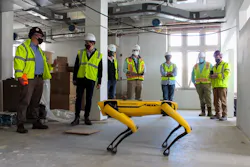
Developments in reality capture devices have simplified many construction tasks and increased transparency between crews and their customers. The technology itself has been around for decades, dating back to the 1960s and being introduced into the world of construction in the 1990s in the form of laser scanners.
Modern developments have removed the manual task of measuring from the equation, leading to faster, more accurate data collection. Adding drones and AI-enhanced reality capture has also streamlined the project planning phase. The ease of creating 3D models and digital twins through these technologies speeds the process, reduces human error, and improves collaboration.
Common Uses: LiDAR scanning/scan to BIM, drones for roof/exterior
capture and measurement, as-built vs. design deviation reporting
Average Cost: $3,000 - $50,000+
Gartner Hype Cycle phase: Slope of Enlightenment. A safe bet for many.
Implementation Challenges: High initial investment costs, technical requirements/limitations for proper use, field operational difficulties (user error, inefficient data scanning due to poor line-of-sight accessibility), training requirements, fears of automation leading to layoffs, worker hesitancy to embrace new methods over reliable older methods
Where It’s Winning: Commercial and institutional projects (hospitals,
office buildings), infrastructure and civil projects (roads, bridges, utilities), complex renovation and retrofit work, high-tolerance industrial and manufacturing facilities, large earthworks and site development projects
Notable Examples:
- Doxel
- DroneDeploy
- Evercam
- Hover Connected Visual Platform
- Matterport
- OpenSpace
- PlanRadar SiteView
- Portal
- Reconstruct
- Trimble ProjectSight 360
- ZenaTech drones
AI in Customer-facing Work

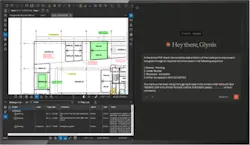
Augmented reality render tools, custom chatbots, and AI-written documents are examples of customer-facing AI opportunities. Rendering tools can instantly present multiple sketch options to clients—while they are sitting in the room being designed. Also in real time, custom
chatbots can answer most of the simpler questions clients might have, allowing designers and project managers to focus on details where a strong human touch is needed. Real-time updated construction agreements dramatically save time, increase accuracy, and build the customer relationship. These tools can help small companies feel big.
Common Uses: Virtual/augmented reality for design sketches and walkthroughs, customer support chatbots, conversational AI for BIM data, AI-generated proposals/contracts, trend/demand predictive analytics, automated follow-up scheduling.
Average Cost: Ranging from ~$65–$299/user/month for entry-level AI to ~$10,000–$100,000+/month for top-tier enterprise AI
Gartner Hype Cycle phase: Peak of Inflated Expectations. Jump the disillusionment trough by narrowing down the hype to what today’s tools do very well and manage your expectations.
Implementation Challenges: Incorrect AI data if information is being pulled from multiple sources, impersonal approach may result in resistance from clients, data security concerns, high implementation costs, uncertain ROI, staff workflow disruption/resistance, customization for project-specific workflows increases implementation complexity
Where It’s Winning: Residential and multifamily (blueprint analysis, estimating, proposal generating), design/architecture (generative models), commercial construction (reporting, automated communication, client insights), infrastructure and civil (schedule/risk forecasting)
Notable Examples:
- Autodesk
- ALICE Technologies
- Bluebeam
- Buildots
- Buildxact
- Chief Architect
- DZINLY
- Fireflies.ai
- HoloBuilde
- HubSpot
- Jasper
- Matterport
- OpenSpace
- Oracle
- Pillar
- Procore
- Ressio Software
- Togal.AI
- Trunk Tools
AI in Operations
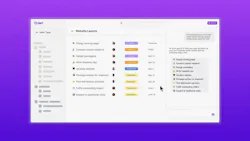
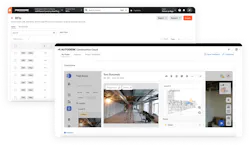
Behind the scenes, “back-office” work is also made simpler through AI tools. Office workers can delegate monotonous administrative tasks, like document updates and progress reports, to an automated tool, presumably making them more productive. Beyond documents, AI-enhanced tools can be used for safety/hazard predictions and early detection of construction defects.
Common Uses: Predictive analytics and real-time monitoring, AI predictive maintenance, Natural Language Processing (NLP) for compliance and documents, AI productivity analysis to improve operational performance, document processing/management, automated progress report generation, updating schedules, extracting/validating invoice data, document information summary/retrieval
Average Cost: ~$50–$200 per user/month for basic AI tools
Implementation Challenges: Scattered data across different
systems leads to inaccurate predictions, harder to quantify ROI with no
measurable gains, cultural/workforce resistance, AI training/outsourcing leads to higher costs, integration with legacy systems requires significant engineering, investment may be too expensive for small/medium-sized businesses, AI decisions/recommendations could lead to regulatory/legal issues, data privacy/security concerns
Gartner Hype Cycle phase: Peak of Inflated Expectations/Trough of
Disillusionment. Moving from the “slices-dices” phase to “No it doesn’t.” Not a safe bet for widespread adoption.
Where It’s Winning: Residential and multifamily (estimating automation, workflow automation, predictive resource management), commercial construction (safety/incident prediction, document automation, progress tracking), infrastructure (schedule optimization, resource allocation), industrial/warehouse (site progress tracking, BIM coordination), construction management (centralized reporting/analytics, AI knowledge retrieval
Notable Examples:
- Buildots
- Civils.ai
- ClickUp
- ConstructAI
- Dart
- Datagrid
- Doxel
- Foresight
- Newmetrix
- OpenSpace
- Procore
- Qamaq
- Scalera.ai
Where is this heading?
The technological landscape of today is evolving at an exponential rate, and remodelers have a lot to gain if they start to embrace the change. Streamlining processes and utilizing these new tools is likely to result in smoother workflows and more efficiency among you and your team. Minimizing common issues (miscommunication among clients, miscounting the number of windows) starts by assessing which technological advancements have the greatest chance of benefitting your business and taking the steps to implement them into your everyday work.
About the Author
 Tyler Rhyan
Tyler Rhyan
Associate Editor, Products Coverage
Tyler Rhyan is the associate editor for Pro Remodeler. He can be reached at [email protected].